
Most OpenCart admins start their day the same way. Open the panel. Click into reports. Pick a date range. Wait for the page to load. Repeat the same sequence for orders, then stock, then revenue. By the time they have three numbers in front of them, ten minutes have gone by.
There is a faster path. The OpenCart AI sales analytics solution by Knowband puts a chat interface directly inside your admin panel. Type your question in plain English, and get the answer from your live database in seconds. That is the entire shift: from clicking through menus to asking questions and reading answers.
What Daily Store Reporting Actually Costs You
The problem is not that OpenCart’s reporting section is broken. The data is all there. The problem is that accessing it requires navigating to the right page, setting the right filters, and repeating the whole process for every different question. A Shopify community thread from late 2024 captures this well: one merchant described turning what used to be “a 2-second glance” into a “5-minute job” after a dashboard change. The frustration is universal across platforms: reports are designed around data structure, not around how admins actually think.
For a typical store, a morning check covers orders placed overnight, current stock on fast-moving products, any abandoned carts from the previous day, and yesterday’s revenue total. In a standard OpenCart setup, that means four separate navigation sequences. Multiply that across a week, and you have burned through close to three hours doing nothing but loading report pages.
How the OpenCart AI Sales Analytics Plugin Changes the Interaction Model
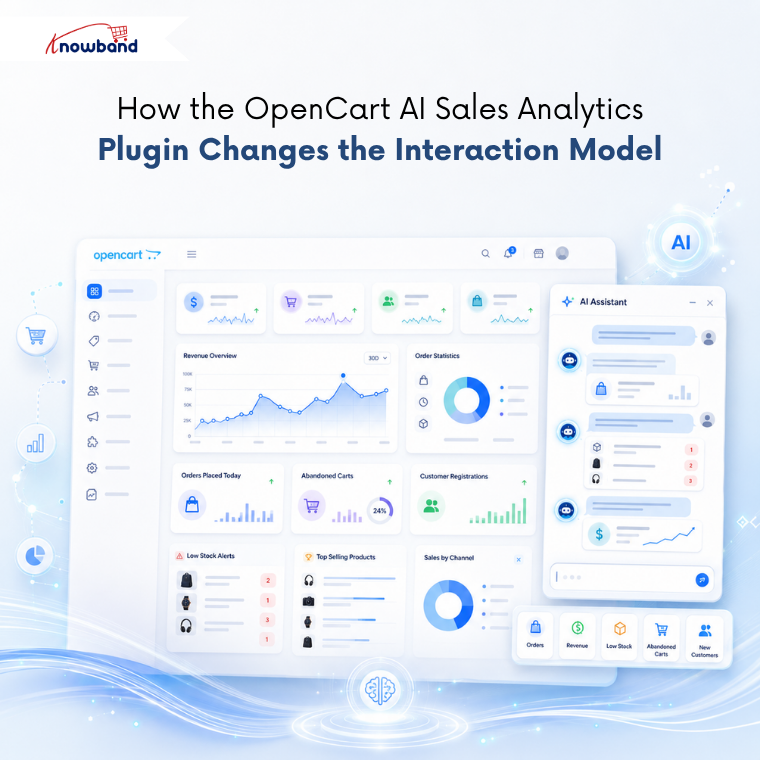
The OpenCart Smart Admin Assistant installs as a module and places a chat widget in the corner of your admin panel. Connect it to an AI model, OpenAI ChatGPT, Anthropic Claude, or Google Gemini, using your own API key, and the assistant starts answering questions from your live store database.
Ask “How many orders were placed today?” and it returns the number. Ask “Display products whose stock is less than 5 units.” and it lists them. Ask “What was total revenue last 30 days?” and you get the figure without opening a single report page. The assistant works through pre-built read-only MySQL views, which means it can only retrieve data; nothing in your store can be modified, updated, or deleted through the chat under any circumstances.
For teams checking the same figures every day, the module includes predefined chips: one-tap question shortcuts that send a stored query to the AI immediately. Ten chips come ready by default, covering orders, revenue, abandoned carts, low stock, and new customer registrations. The daily check that used to take multiple navigation sequences collapses into four taps.
The SQL Transparency Feature That Actually Matters for Serious Merchants
One of the less-discussed capabilities of this OpenCart AI Sales Analytics Plugin is the SQL visibility toggle. Enable it, and every answer the assistant gives shows the SQL query it ran underneath the result. You do not need to write SQL to use the tool, but if you want to understand exactly how a figure was calculated, the query is right there.
Take it further: the module also allows SQL editing directly in the chat. Got a revenue figure for the last 30 days and want to check the same number for Q1? Edit the date range in the query and run it again without typing a new question. For merchants who work with developers or want to build deeper into their eCommerce reporting workflows, this bridges the gap between plain-language convenience and technical precision.
The query history tab keeps a log of every question asked, who asked it, when, how many rows it returned, how long it took, and which AI model handled it. For multi-admin stores, this makes audit trails straightforward.
Role-Based Access and Multi-Admin Stores
OpenCart Back Office Analytics becomes complicated when multiple people need different levels of data access. A logistics manager needs stock levels and shipping data. A sales lead needs revenue and order counts. An accountant needs something different again.
The Access Control tab in the module handles this directly. Enable role-based access, and you can specify exactly which admin profiles can open the assistant. Profiles that are not ticked see no chat widget when they log in. SuperAdmin access stays on by default and cannot be removed. Every other role is configurable, which means the right people see the right data without requiring separate reporting tools for each team member.
Setting Up the OpenCart AI Sales Analytics Plugin: What You Actually Need
To set up the OpenCart AI Sales Analytics Plugin by Knowband, you first need to install the extension, which follows the standard OpenCart module process: upload the ZIP via the Extensions installer, click Install, then open the configuration panel. The module works on OpenCart 3.x and requires PHP 7.2 or higher.
The only external requirement is an API key from your chosen AI provider. Works seamlessly with popular AI platforms such as ChatGPT, Claude, and Gemini. Each provider offers multiple model tiers, faster and cheaper models for routine daily admin checks, more capable models for complex queries that pull across multiple data sources. You pay only for what the AI actually processes, with no separate subscription to Knowband or any intermediary.
The first time the assistant runs, it builds a schema cache, a structural map of your store database, so it can generate accurate queries. After any database change, such as installing a new extension or upgrading OpenCart, a single click on “Refresh Schema Now” rebuilds it.
When Plain-Language Store Queries Beat Traditional Reporting
The merchants who get the most out of this OpenCart back office analytics extension are not necessarily the ones with the most complex stores. They are the ones who check the same numbers every morning and want that check to take under a minute instead of ten.
Ask the assistant what it covers, and the answer is almost everything you would check manually: orders, customers, revenue, stock levels, abandoned carts, discount coupon usage, product variants, shipping carriers, and brands. The Database Views tab controls which domains are active; unticking a domain removes it from the assistant’s query scope without deleting anything from the database.
For any OpenCart merchant who has ever pulled the same revenue report three days in a row, this is what the OpenCart Smart Admin Assistant exists to remove.
The Practical Starting Point
If getting basic store data requires multiple manual steps each day, AI can make the process significantly faster. The numbers do not change; they just become faster to reach.
The OpenCart back office analytics extension is available on the official website of Knowband, where you will also find current compatibility details and version notes. The user manual is also available on the product page, which will walk you through every configuration tab if you want to review the full setup before purchasing.


